Friday, August 26, 2011

Polish your Photos Series: Quick Tips to Make them Shine


Hi, I am Becka (beckarahn) and I have been an Etsy seller since 2005. I am a fiber artist and technology geek. Through the years a lot has changed at Etsy, but having great photos of your work has always been the most important thing for a successful shop. The goal of this series is to show you some common photo problems and give you ideas of how to fix those flaws in just a few steps.


Quick Tip #2: White not Grey
I like to photograph my art against a white background. Sometimes when I don’t have enough light, that background turns out looking grey instead of a nice bright white, and leaves everything looking a little depressing.
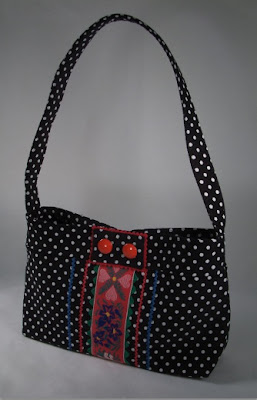

The solution for this photo problem is very similar to how we corrected the “golden glow” in the last tutorial.

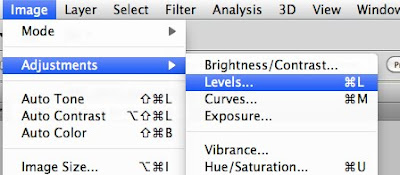
This time, open your image in Photoshop*, go to the “Image” menu, then choose “Adjustments”, then “Levels”. The “Levels” tool works great with photos that are under or over exposed. This sample photo (above) is under exposed and that is why those whites don’t look white.


Find the eyedropper that looks like it is full of white paint. Click on an area in your image that is supposed to be white. Try a couple of different areas on your photo to get the effect you like.
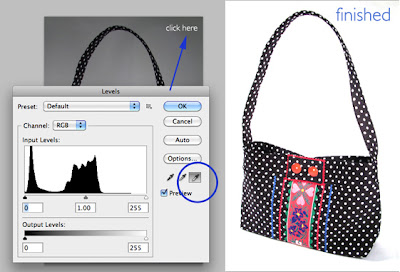


Be sure to save this new corrected photo.

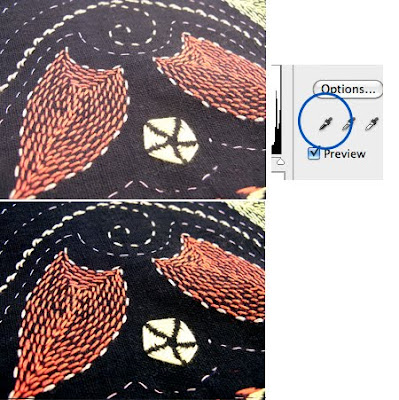
This tip also works with photos that have black that doesn’t look black. This embroidery image below is over exposed so the background looks grey and not black. This time choose the Levels tool and pick the eyedropper that looks like it is full of black paint, then click an area of the photo that is supposed to be black.

(*The screen shots for this tutorial are from a Mac using Photoshop CS5. Other versions of Photoshop will have the same tool, but the menus might look slightly different.)

What if you don’t have Photoshop? Try looking for a “Brightness” or “Exposure” setting in your favorite photo software (ie Picnik, iPhoto, Picasa, Lightroom). That tool should have a similar effect.

Tuesday, August 9, 2011

Polish your Photos Series: Quick Tips to Make them Shine


Hi, I am Becka (beckarahn) and I have been an Etsy seller since 2005. I am a fiber artist and technology geek. Through the years a lot has changed at Etsy, but having great photos of your work has always been the most important thing for a successful shop. The goal of this series is to show you some common photo problems and give you ideas of how to fix those flaws in just a few steps.


Quick Tip #1: The Golden Glow
A common problem I see with photos is the “golden glow” caused by photographing under regular indoor incandescent lights. Although this is a nice sharp photo, you don’t get a real sense of the color of the pendant because everything in the photo is very yellow.


My favorite way to fix this “golden glow” is to use the Curves tool in Photoshop*. First, open your photo file and then go to the “Image” menu, then choose “Adjustments”, then “Curves”.


A dialog window will pop up. Look for the eyedropper icon that looks like it is full of white paint. (There will be a black and a grey one too.) Your cursor will change to an eyedropper.


Go over to your image and click in any white area of the background. By clicking, you are telling Photoshop: “This spot I just clicked is supposed to be pure white. Please readjust everything else in this image so that spot looks white.”


Try clicking a couple of different spots in your image until you get just the right adjustment. Now the white background looks white and the color of the pendant really pops. Once you are happy with your new image, then click “OK”, save your image and you are ready to post it in your shop.


(*The screen shots for this tutorial are from a Mac using Photoshop CS5. Other versions of Photoshop will have the same tool, but the menus might look slightly different.)


What if you don’t have Photoshop? Try looking for a “White Balance”, “Neutral Picker” or “Temperature” setting or an eyedropper icon in your favorite photo software (ie Picnik, iPhoto, Picasa, Lightroom). That tool should have a similar effect.

Stay tuned for more "Polish your Photos" tips to come.

Wednesday, August 3, 2011

Etsy's New Focus on Relevancy and How it Effects Your Shop

Hopefully you've already seen the info on changes Etsy rolled out last week, which will soon make "relevancy" the default search. However, if you haven't I'll give you the "411" and help you determine what you can do to make those changes work to your benefit in Etsy searches.

When searching on Etsy you have options to the narrow the searches. We are focusing on "relevancy" for this article, as it appears that more people are searching via relevancy - and soon it will be the default search.

❀ Item titles are now given more weight. Tags are important but your item title is even more critical. As titles are the most direct way for sellers to explain what they have, Etsy has given them more weight in Etsy searches. This means that it is critical that you have complete, accurate and descriptive titles for all the items you list. (Remember do not use the "name" you have given your art as a title, but describe what it is.)

GOOD title "Original Painting, Acrylic Seascape, Southern California Pacific Ocean Cliffs, Blue Green Turquoise, 11 x 17"
Not so good title: "The Calm Before The Storm, Seascape 11 x 17"

❀ Words that appear at the beginning of your title are given more weight. So, you will want to put the defining word/s of your item (sign, photo, bracelet, art print, oil painting, earrings, baby hat, coffee table, etc.) in the first 2-3 words. You will see better results if you put the most important characteristics of your item at the beginning of your title.

GOOD title: "Pearl Earrings, Sterling Silver Amethyst Beads, Extra Long Dangles, French Hooks"
Not so good title: "Elegant, Dressy, Fancy Handmade, Evening Style Pearl and Amethyst Earrings"

❀ Exact word pairs are now given more weight. If your search includes 2 or more words, Etsy will prioritize the search results that have those exact 2 words next to each other. For example, if I search for “California Seascape”, items that contain “California Seascape” (exactly) in the titles or tags will appear higher than ”Seascape Photo of a California Beach".

❀ Recency will also factor into searches sorted by relevancy. When a broad search (like “photo print”) returns a huge number of results, Etsy gives some priority to the most recently listed items in that search.
Before the Holidays take over our thoughts and shops, now is a great time to revamp your titles and make sure you use accurate descriptive words, putting the emphasis on the beginning of the title. If you do this - and someone is searching for items like what you make - you are more likely to show prominently in searches on Etsy.

Recent Etsy Blog Article on the Relevancy Search.
Etsy forum post from Frank/Etsy:  Relevancy Update

Have a great week, everyone!


Captain, Sellers Assisting Sellers Etsy Team

Thursday, June 23, 2011

Big News - Team Changes!

Hi Everyone!

I have some big new changes to announce.

Steph (PandaCub), who has been leading SAS since Anna (TheHouseofMouse) has stepped down as Captain, is in need of stepping down from the Captain's duties as well.  She will be staying on as a leader in the SAS Team Forum on Etsy, and I would like to take this opportunity to thank her for her all she has done for the team (and helping me with the transition)!

I have been Captain of the SASsy Critique Forum since Anna left, and enjoyed it tremendously!  So much so, that when Steph was looking for someone to take over for her, that I was happy to step up and take the job as Captain of the entire SAS Team (including the Critique Forum).  I look forward to assisting you all in your efforts to assist the sellers of the Etsy community.

If you have any ideas how we as a team and individuals can better serve the sellers of Etsy, please drop me a note, or post a thread in the SAS Team Mentors Forum. The easiest ways to reach me is by sending a message via either of my Etsy shops, KnitzyBlonde or ZaftigDelights, or you can email me at zaftig2k at yahoo dot com.  


I would love to see a resurgence of the team blog. It is such a valuable resource. Prior to this post, no one had posted since April.  I know that many of you have blogs and post regularly so anything that you have posted to your blogs that our readers would benefit from would be great to share here as well.  I'd also love any of you that enjoy writing to please send me your ideas for blog features.  They don't have to be long or involved.  Sometimes short and sweet is better!  But it would be great to hear from more of you.  I'd love stories about how you may have helped a seller with some specific ideas that can also help others.  If we publish you on the blog you always get a reference link to your Etsy shop as well, so it is a win/win!


I could also use more regular Mentors helping with critiques and questions in the SASsy Critique Forum.  I only have a handful of regular Mentors that help with critiques right now, and it would be nice to lighten their load a bit. Our Critique Forum is becoming a very busy place as we have received a lot of recognition lately (see next paragraph). If you could do one critique a day, or several a week, we would be thrilled to have you join us!  Let me know if you are interested.


Just yesterday there was a feature on me and our team on Handmade Spark!  I hope you'll stop by and check it out.  

I look forward to getting to know you all better!


SAS Captain

Saturday, April 2, 2011

Mini Critique: Sections that Sell

Hey everyone! Meagan here. I have an important announcement for you all. First off, I hope you all are doing well, & learning a lot from these mini critiques. I have really enjoyed doing them. Now, just for the record, today will be the last mini critique I'll be posting on a regular basis. Yep it's true! We've covered a lot of the basics on shop set up & I think we're at a good stopping point. Sooo, if you have a question about something. You can always convo me on Etsy @Baby Swank & I'll be glad to direct you to some great info & give you my advice or you can email me at meagan {at} meaganvisser {dot} com too.


So, onto today's critique...Sections that Sell.


As some of you may know, I have a blog series running on my blog right now called ReVAMPing Your Etsy Shop - 2011 & it's a lot like these mini critiques. It's a ton of shop how-to & advice from several different Etsy sellers.


Now this weeks blog post was on Shop Sections, Rearranging Your Shop, & Featured Listings & it was written by the lovely Kimberly of Cinnamon Spice on Etsy. So I'm going to let you in on a bit of her advice today...{that is if you haven't already read it on my blog ;P}. So the following is the excerpt from this weeks post - all about different ways to use your sections. Then following that I'm gonna show you 3 shops that I think are using their sections well! So here we go...


From ReVAMPing Your Etsy Shop - 2011 Blog Series via MeaganVisser.com


Let’s face it, we’ve all been to the “discount” brick and mortar stores that are a jumbled mess, and while sometimes I do enjoy unearthing that incredible buy, I much rather prefer to shop in stores where merchandise is well organized.  Your Etsy shop is no different.  The key is finding which style works for you and your potential customers.  The best part is you can experiment until you’re happy with the results!

Shop Sections

Use Shop Sections to categorize your items. Some effective styles are to:
Organize by Theme – For Cardmakers and shops that cater to party planning and decorating, a great way to organize your shop is by theme. Most of your shoppers will probably be looking to buy for a special occasion such as birthday, anniversary or holiday.  Tailoring your sections according to theme, like inkylivie does should help guide them directly to what they need!
Organize by Size – Most shoppers really appreciate being able to hone in on the exact size they are looking for whether they are buying jewelry, apparel, handbags or shoes.  Save your customers time by using the sections to group your items by clothing size or even small, medium and large works well or non-apparel items.  Cite fuzz labels her hats by size for quick reference.
Organize by Type of Item – Paper crafters like myself can benefit from organizing their stores by type of item.  When shoppers visit my store they can instantly see what type of paper crafts I specialize in, whether it’s an Altered Journal, my “Get Scrappy Kits”, a Greeting Card or a Mini-Scrapbook Album.  This style also works for hair accessory makers and those with a variety of different items for sale.  Lil’ Princess Bow and Mary had a Little Party have their shops wonderfully organized by type.
Organize by Price – Bath and body sellers, or other sellers that make use of gift baskets or groupings, can get a lot of mileage from using their shop sections to organize by basket and price.
Organize by Color-  If you make similar items in several different colors, you may help your visitors narrow their search by grouping like colors together.
Now, have fun orgzanizing your Shop sections!  Create and/or edit your sections in Your Etsy > Shop Settings > Info & Appearance (there is a tab for Sections).
Okay, now if you want the rest, you know where to go. Right here. So now I'm gonna show you 3 shops on Etsy that I think are following Kimberly's advice & using there sections well!
So as you can see Knarken sells jewelry & she's using her shop sections to direct customers to specific types of items.


Okay, in Dolly Rocker Candles you can see that products are listed by scent and type. Awesome!
And lastly, Miss Merryweather's Creations lists her very cute card by Theme.
Alright! Now go check your shop out, see if your sections are directing customers & making it easier on them to shop. If not, see if you can make them work using any of the above suggestions from Kimberly.

Once you're finished, leave your shop link in the comments below so we can check out your improvements!!

Don't forget to connect with me on Facebook & Twitter!