Tuesday, March 31, 2009

Blogger How-To: Open Links in a New Window

This is my favorite html tip when it comes to blogging (and web design). It's easy and important, in my opinion, but you will find varying opinions on this topic in the web world. I think one of the worst things you can do on a website is send your visitors away through a link and make it hard for them to get back. The easy solution is to set your links to open in a new window and you can do this with a simple addition to the html code.

First, I will show you an example. The link to my shop below does not have the additional html code:
Visit my Etsy Shop!
When you clicked the link, it took you away from this blog post and to my shop. Now if you started browsing around my shop, maybe through Etsy and onto other pages, you would have to go back back back to return to the blog and chances are, you forgot you were there maybe even before reading the entire post.

Now, this link has the html coding to open in a new window added:
Visit my Etsy Shop!
When clicked, it opened the link to my shop in a second window allowing you to browse around my shop but also easily come back to the blog post. I find this especially useful with an artist feature or giveaway - the reader can click links to view the artist's work, pick their favorite items etc, but still have the blog post open to continue reading the interview or enter a giveaway.

Ok, here comes the how-to:
To set your links to open in a new window you will need to manually enter the html code after the links in your post. If using the "compose" tab to create your post, you will need to switch to the "edit html" tab.
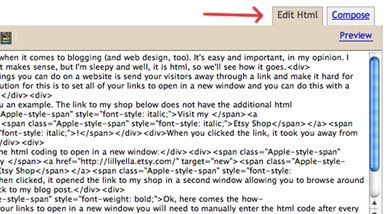


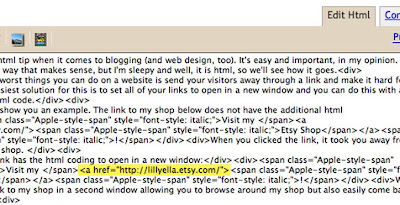
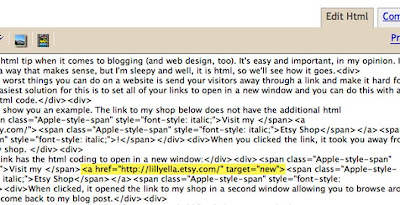
The html code that you need to insert is target="new" and you will add it in at the end of the link after the " and before the >, see the screenshots below for reference.

Before:

After:

There are other ways to do the same thing through template changes and different html code, but for me, this works! If you have any tips related to this or blogging in general, we'd love to hear them and please feel free to leave any other blog questions you have in the comments below and we'll do our best to answer them!

About the author: I am Nicole, the gal behind lillyella. I just celebrated my one year anniversary of selling on Etsy and am hopelessly addicted to my shop and my blog. I'm always open for helping and answering questions, so please feel free to contact me at any time!

Sunday, March 22, 2009

UPDATED- Hearts, Views and Treasuries

Since my last post there have been updates to the search features available below:

Craftcult.com has now added a feature tab where you can find if you have been featured on the front page of etsy or in the gift guides! You can also search by member name, and date appeared.....check out "The Vault"

Craftopolis.com has also updated their site to include a gift guide search.


Happy Searching =)
Amanda
Sygnet Creations

Monday, March 9, 2009

Hearts, Views and Treasuries

Ever wonder how many shop hearts and views you have, if you are featured in a treasury, gift guides or front page? Check out these great tools created to help sellers just like you!

Lets start with views and hearts: Most etsy sellers know that by going to each item with in their shop they can click the link 'see who hearts this seller' and 'see who hearts this item' to see how many hearts they have...... But did you know about CraftCult? Craftcult is the home of the Heart-o-Matic
Type in your username and hit submit. You can see recent hearts, which items have hearts, and there is a tab to update 'real time' views that your shop has received. If you are looking to spread the word about your shop this is also a good promotional tool. click on the link at the bottom about advertising and found out how you can get your shop listed along the side.

Are you in a treasury?
You can go to the treasury and treasury west tabs with in etsy and search page by page for that lucky little star or you can head over to Craftolopis. All you have to do is type in your username and you will see all treasuries currently featuring your items. There is also a tab for gift guides, which are coming soon. In the mean time try this handy trick. Go to google search and type in

username site:http://www.etsy.com/gift-guides/


So this is what I would type in:

sygnetcreations site:http://www.etsy.com.gift-guides/


This search will bring up each gift guide you have ever been in not just the ones where you are currently featured. Have fun searching!

Was I on the front page?

All of a sudden your views are up, sales are up, and your hearts are flowing in... but you didn't see yourself on the front page. Don't worry, There is a group on flickr that pools screenshots of all treasuries that have made it to the front page of etsy. Just go to the Etsy Front Pagers group and search for your shop name in their picture pool.


You are now armed with fun tools to ease your obssesion.... but be warned..... You will find a brand new addiction to checking these sites daily for new info!

About the author: I am Amanda, owner extraordinaire of Sygnet Creations. I have been selling on etsy for over a year now and I loving it! I am a full time mom and military spouse. I tend to know a little about everything and I am always a friendly ear and convo away. Ask me anything.

Friday, February 20, 2009

Setting up a newsletter for your customers!

Hello! It's Renovia from Endless Whimsy again!

Newsletters can be a great tool to get information out to your customers. They are cheap to produce and keep your customers informed. Be careful! You don't want to send out too many, people hate spam, once a month is usually OK. Use your newsletter as an occasional tool to offer great deals to your subscribers or let them be the first to know of a new product.

If you know how to use a web page editor like iWeb or Dreamweaver or other WYSIWYG (what you see is what you get) editor then you can send out a web newsletter! Hooray!

I'll walk you through the process of Google Docs, putting a form on your blog, newsletter design, importing subscribers addresses and sending the newsletter.

Google Docs & Blog

1. Add a Google Form to your blog or website. Sign up with Google Docs (it's free) and click “New” and “Form”


2. Title the Form, Edit the “Name” field, Change the word “Name” to Email and DELETE the “untitled question” at the bottom of the form. Click DONE!

3. Go to “More Actions” and click “Embed”. Then copy this code into an HTML/Javascript widget on your blog or website (usually found in 'settings or layout').


iframe ------------------------->


Result:
You can tweak the settings and placement and confirmation message within Google Docs.


Design your Newsletter

In your web site editor, design a page exactly the way you would like it to look if you were to receive it in an email. Be sure to include your banner, a click to view online link, an unsubscribe link and copyright. Name your page “newsletter” and upload it to your webserver. It's ok if it doesn't link to other pages within your site.


Import your subscribers addresses

Go to Google Docs and copy any emails of subscribers and import them into your address book under a group called “YOURSHOPNAME”. Don't forget to check your email preferences to be sure Group Emails do not display individual emails but keeps them private.

Send your Newsletter

1. open up the online version of your newsletter (http://www.example.com/newsletter.html) in SAFARI.

2. Go to the File menu in Safari and click Mail Contents of this page. It will open up a new email within your computers default mail program.

3. Address the email to the “YOURSHOPNAME” group. Check to make sure everything looks the way you'd like, a trial run to yourself isn't a bad idea.

SEND!

Thursday, February 12, 2009

Come and play in the Virtual Labs with us!

A few of us will be in the VL tomorrow at 3:00 Etsy Time for quick critiques and tips. Team members are encouraged to stop by and help out and all shops are welcome to stand in line for a critique. The more the merrier! I'll be hosting this session with Valerie from CrochetGal in the classroom.

If you miss this one, you get another chance on the 18th at 6:00. Keep an eye on the schedule for future dates. See you there!

A little bit about me: I'm Andrea from kitsandcaboodles.etsy.com. I have been part of the Etsy community for over a year and just recently reached 1000 sales! I'm thrilled to be able to share what I have learned with others. You can find me often in the forums or one of my monthly critiques in the Virtual Labs. Or you can visit my personal blog.